
Where to find it
The security score card sits in the middle of the app's home screen. "View details" opens the full password health check.
The check runs on your device and uploads nothing.
⚠️ It looks at passwords only — not 2FA codes, documents or payment cards.
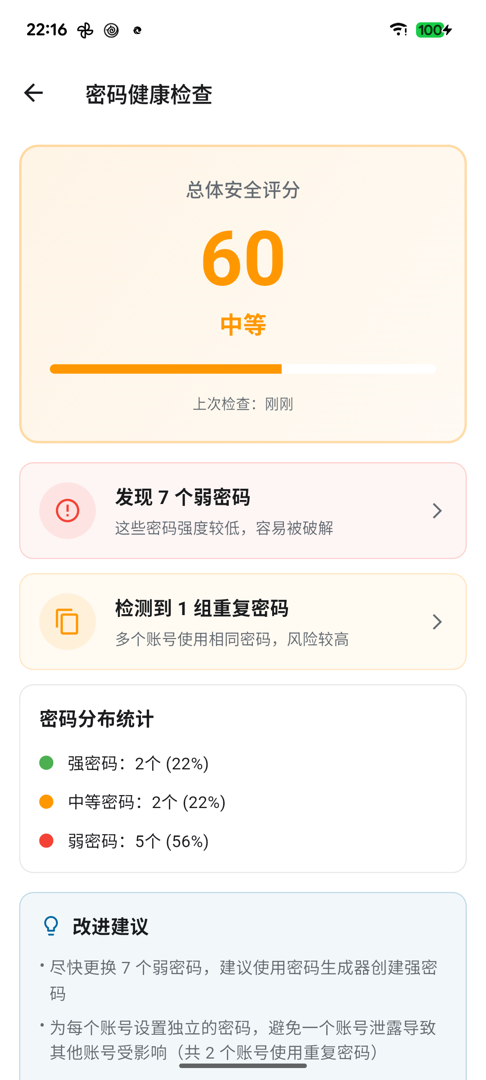
What it looks for
Weak passwords
Passwords that are short, guessable or easy to brute-force. Common words and plain alphanumerics get flagged.
Reused passwords
The same password across several accounts. This deserves attention before mere complexity — one breached site opens every account sharing that password.
Not changed in a long time
Passwords last changed more than 90 days ago. This is the lowest priority of the three — a strong password does not weaken by sitting still, so treat it as a nudge rather than a fault.
Strength distribution
Counts and percentages across strong / medium / weak, so you can judge the overall state rather than just the number of bad ones.
How the score works
It starts at 100 and deducts per problem:
| Problem | Each | Capped at |
|---|---|---|
| Reused passwords (per group) | 10 | 40 |
| Weak passwords | 5 | 30 |
| Not changed in a long time | 2 | 20 |
Three ratings: above 71 is good, 41–70 fair, 40 and below poor.
The weightings show the priority: reuse costs the most, age the least — which matches the real risk.
Does a low score matter?
Treat it as a prompt, not an exam. Look at the individual findings rather than the number — three weak passwords on accounts you never use scores about the same as one weak password on your main email, and the real risk is nothing alike.
A sensible order
- Reused passwords first, especially on email, banking and payment accounts — those can be used to reset others
- Then weak passwords on accounts you actually use
- Dormant accounts with nothing important attached can wait
How to fix one
Tapping a finding shows which entries it covers. To change a password:
- Change it on the site or app itself (KeyMe Pass cannot change someone else's password; it only remembers it)
- Generate the new one with the password generator
- Update the entry in KeyMe Pass
With autofill enabled, a site's change-password page will usually offer to save the new one for you, so step 3 takes care of itself.
Document expiry reminders
The home screen's alerts may also show an expired ID document. That comes from document entries and is separate from the password health check — it does not affect the score.